
Documentation
UnityAds Setup
To get started with Unity, first ensure you have the latest version installed on your device. Once installed, launch Unity and create a new project or open an existing one. Familiarize yourself with the interface, especially the 'Networks' tab, where you can manage your connections. To add a new connection, simply click on 'Add new connection' and follow the prompts.
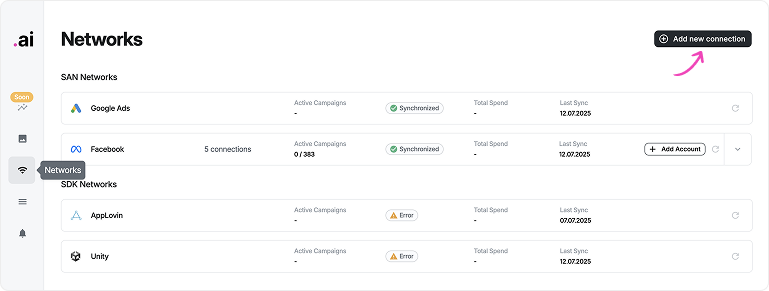
Add Connection
- Choose the following roles and click on “Save”:
- Advertise API Admin
- Advertise Stats API MMP Viewer
- Advertise Stats API Viewer
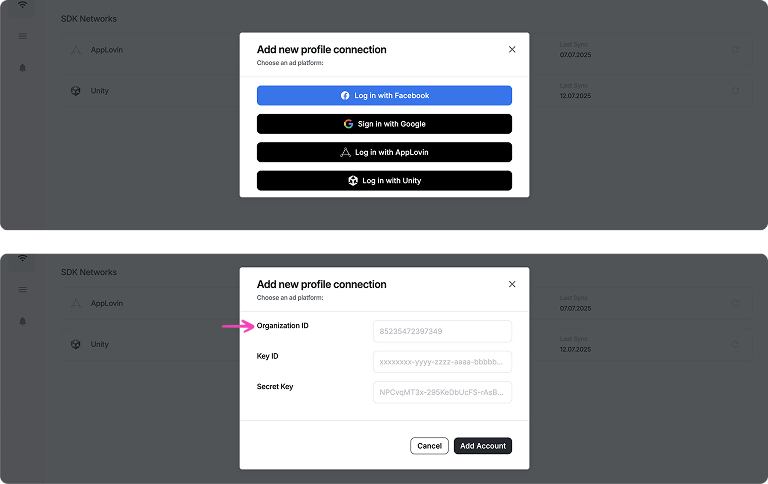
Administration ID
- Choose the following roles and click on “Save”:
- Advertise API Admin
- Advertise Stats API MMP Viewer
- Advertise Stats API Viewer